Features
Scheduling infrastructure that understands business time.
Define when businesses operate. Schedule jobs around working hours, weekends and public holidays. Netsware handles timezones, execution, retries and monitoring through one developer-friendly API.
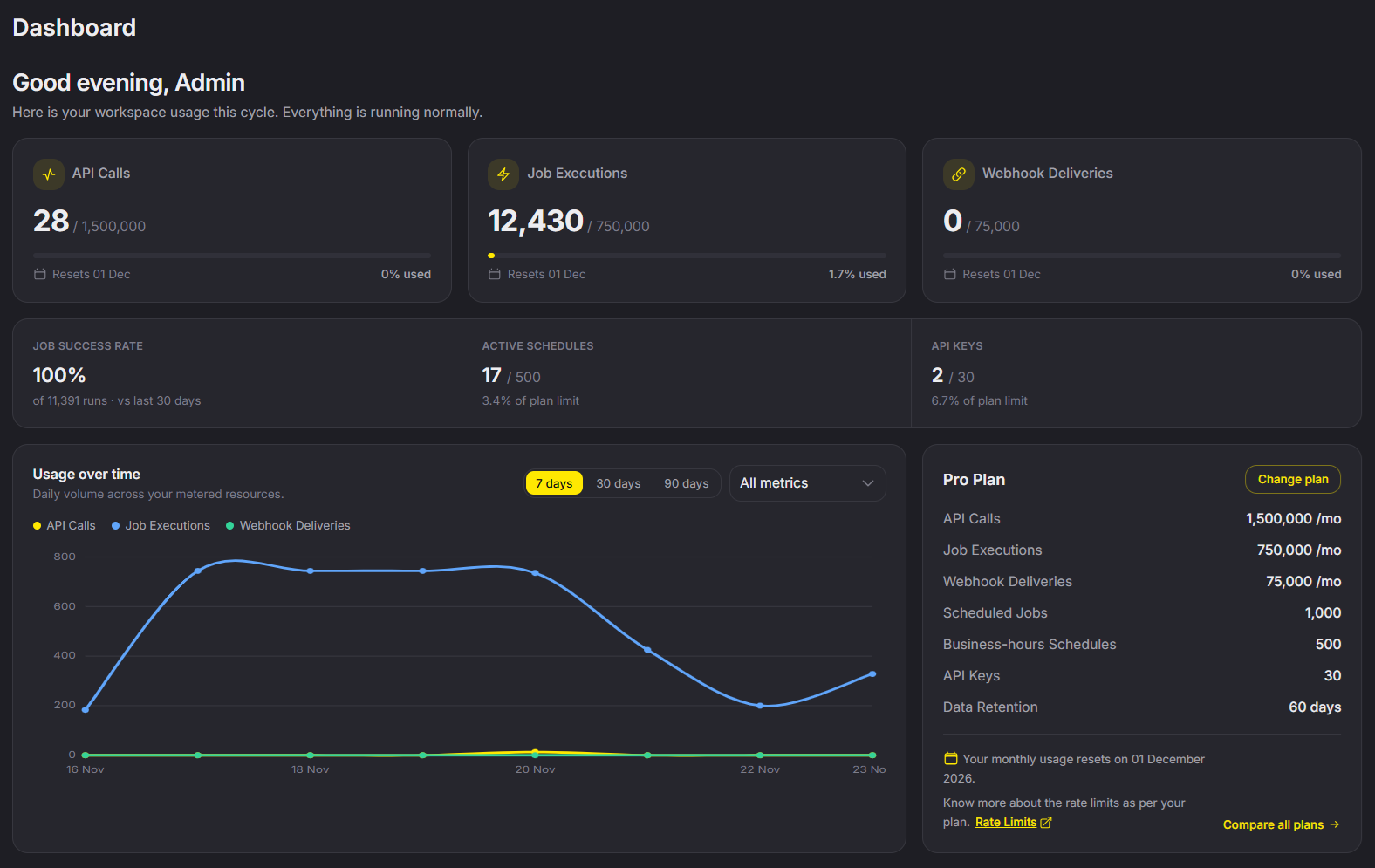
Business-hours schedules
Know when any business is open
Check whether a business is open at any moment, or find its next opening time. Netsware evaluates working hours, weekends, public holidays and timezones in a single API request, and your own hours can be saved as schedules your jobs follow.
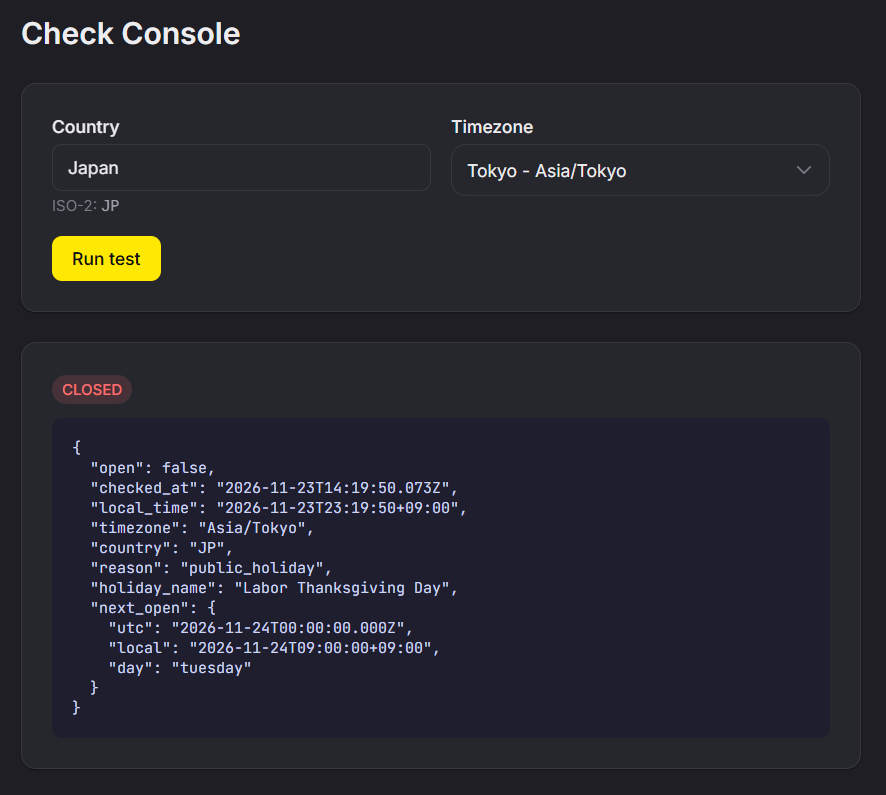
- Real-time business statusEvery check returns open or closed, the reason (after hours, before hours, weekend or a public holiday), the holiday name when there is one, and the next opening time in both local time and UTC.
- Holiday-aware by defaultPick a country and its public holidays count as closed, with state and regional calendars where a country has them. No holiday table for you to maintain.
- Custom business hoursSave a schedule with its working days, opening and closing time, timezone and country. Choose whether public holidays count as closed.
- Overnight schedulesSet a closing time earlier than the opening time, such as 22:00 to 06:00, and the shift is handled as one shift that belongs to the day it starts.
- Check any point in timeAsk about right now, or pass any date and time to see whether the business is open then.
- Business-hours-aware jobsAttach a schedule to a job and the job waits for the next open minute instead of firing while the business is closed.
Public holidays
Public holidays for 226 countries
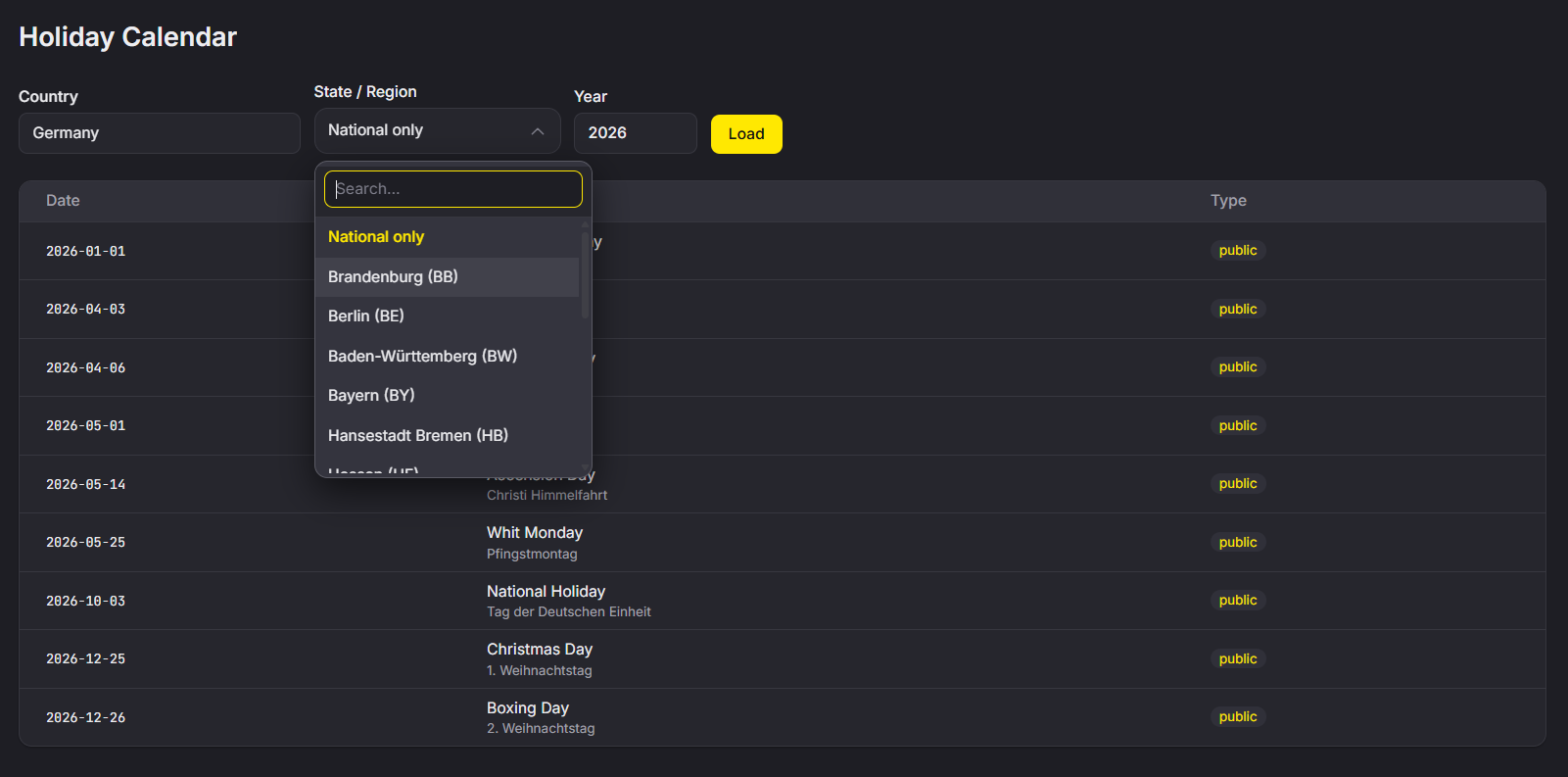
Access public holiday calendars for 226 countries and territories through one API. Retrieve holidays by year, including state and regional calendars where a country has them, and use them directly in business-hours decisions.
- 226 countries and territoriesFrom large economies to small territories, through one consistent API and one response format.
- State and regional calendarsMany countries give different days off by state or region. Pass a region code and you get that local calendar.
- Holidays by yearAsk for a country and a year and get every public holiday with its date, its English name and its name in the local language.
- Built into every checkYou do not need to fetch holidays yourself. Business-hours checks and schedules already treat public holidays as closed.
- Future holiday coverageNext year's holidays are ready long before you need them, including the ones whose date changes every year.
- Official public holidaysOnly official days off are included, so a check never closes your business for an observance that is not a day off.
Scheduled jobs
Scheduled HTTP jobs with business-time awareness
Schedule HTTP requests once, on a cron schedule or as multi-step sequences. Netsware handles execution timing, business-hours restrictions, retries and delivery history.
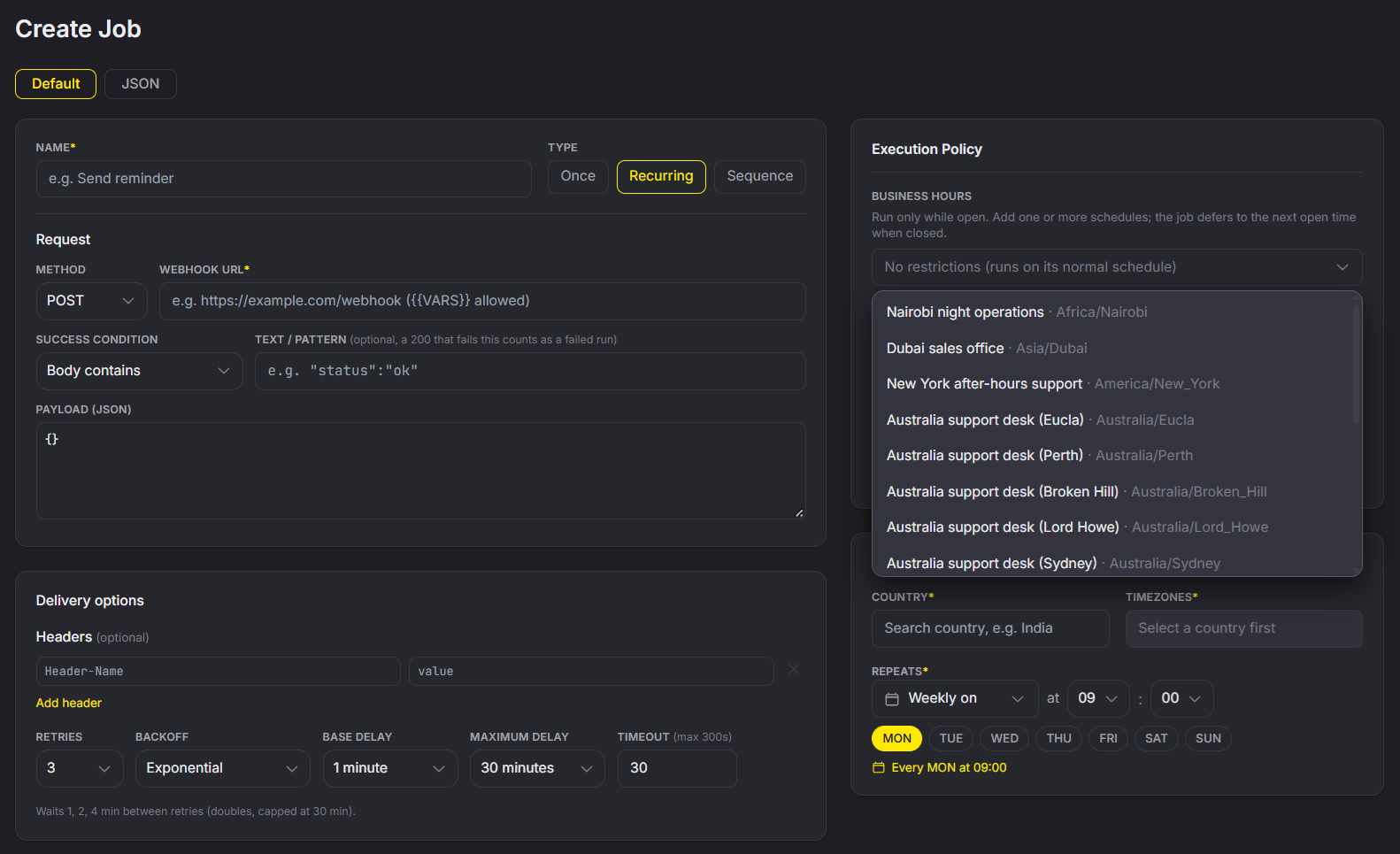
- Flexible scheduling modesRun once at a set time, repeat on a cron schedule, or run a sequence of steps with waits between them, such as an onboarding series.
- Timezone-aware schedulingGive the time the way people say it, such as 9:00 in Asia/Kolkata. Cron schedules run in the job's own timezone.
- Automatic business-hours deferralLink a job to a business-hours schedule. If it comes due at night, on a weekend or on a public holiday, it moves to the exact next open minute. The move is logged with its reason and never uses up a retry.
- Configurable HTTP requestsChoose the method, headers, JSON payload, timeout and which response codes count as success. You can even require the response body to contain, or not contain, certain text.
- Signed requestsEvery call carries a signature and a timestamp, so your server can check that it really came from Netsware.
- Full job controlsPause, resume, run now, retry, edit or cancel any job, organize jobs into groups, and see the history of every run.
Why not plain cron?
Cron knows the clock. Netsware knows the business.
| When this happens | Plain cron | Netsware |
|---|---|---|
| A job comes due on a public holiday | Runs anyway | Waits for the next open minute |
| A job comes due at night or on a weekend | Runs anyway | Waits for business hours, if you want it to |
| Your server returns an error | Nothing happens unless you build retries | Retried with backoff, every attempt recorded |
| A worker crashes in the middle of a run | Missed unless you build recovery | The run is picked up again automatically |
| A job keeps failing | Needs separate monitoring | One alert, then a notice when it recovers |
| Teams in several timezones | You convert offsets and daylight saving yourself | Local times, daylight saving handled |
| Something went wrong last Tuesday | Depends on your own logging | Every run in the history, filterable |
Failure alerts
Know the moment a job fails
Get one alert when a job starts failing, showing whether retries are still running, and a notice when it recovers. Alerts reach the channels your team already uses, not a message for every retry.
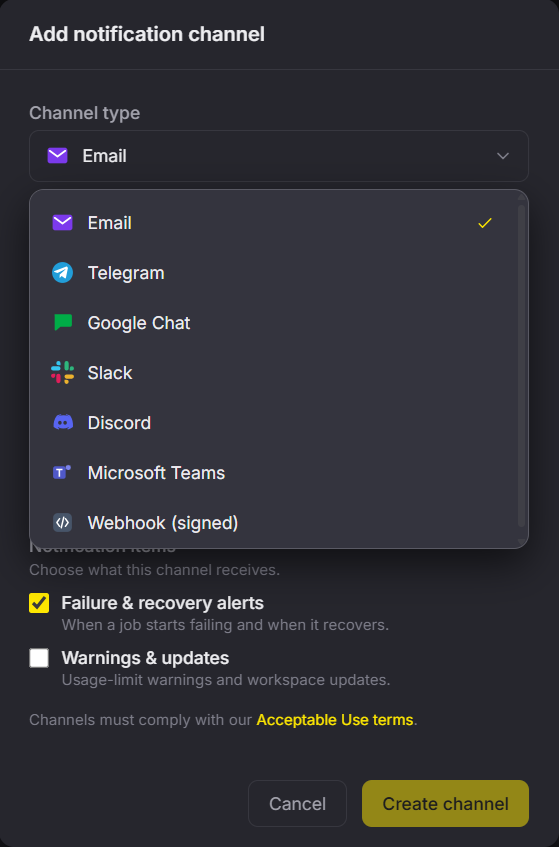
- Multi-channel notificationsEmail and the in-app inbox, plus Slack, Discord, Telegram, Google Chat, Microsoft Teams, or a signed webhook to your own system.
- One alert per incidentA job that keeps failing sends one "failing" alert, then at most one reminder a day while it stays broken, instead of a message for every retry.
- Recovery notificationsWhen a failing job succeeds again, you get a "recovered" notice, so you know the problem is over without checking.
- Actionable failure contextEach alert names the job, what went wrong and whether retries are still running or the job has stopped.
- Reliable alert deliveryAlert delivery is retried if a channel does not answer, and every attempt is recorded, so you can see what was sent and when.
- Simple channel setupChat channels use the incoming webhook link from your chat tool, with no extra app to install. Send a test alert to check a channel before you rely on it.
Reliability
Built for the day something goes wrong
Execution reliability is tested when things go wrong. Netsware retries failed one-time jobs and sequence steps, recovers runs interrupted by a worker crash, protects your server from duplicates and keeps a record of every execution.
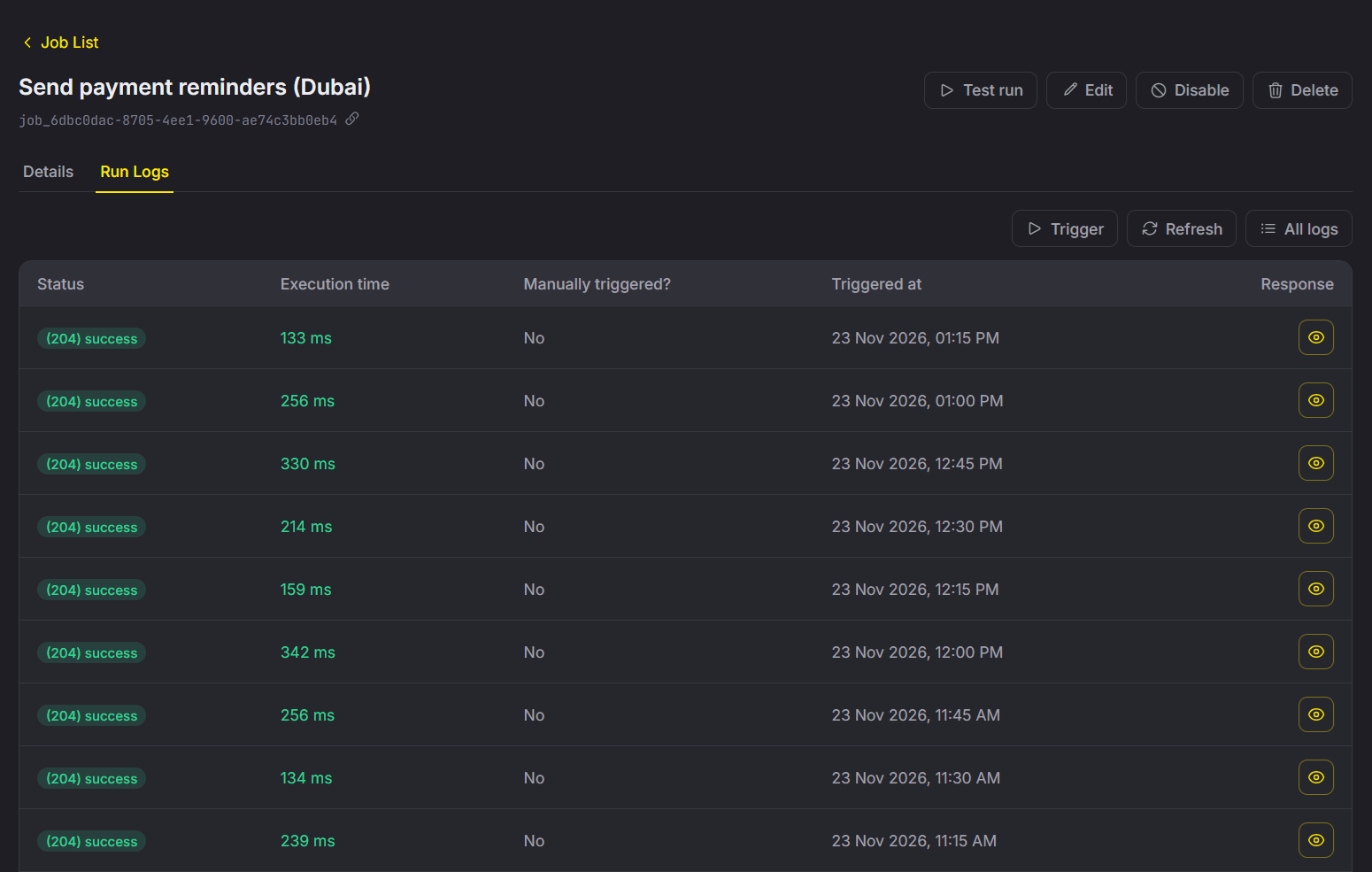
- Configurable retry policiesA failed one-time job or sequence step is tried again according to its retry setting, with a fixed wait or waits that grow after each attempt. A recurring job runs again at its next scheduled time. Every attempt is recorded.
- Automatic worker recoveryIf a worker stops in the middle of a run, the run is not lost. Netsware notices it and puts it back in the queue automatically.
- Idempotency keysEach call carries an X-Netsware-Idempotency-Key header that stays the same if a run has to be sent again, so your server can safely ignore a repeat.
- Timeouts and success criteriaSet how long to wait for your server and which status codes count as success. You can also require the response to contain, or not contain, certain text.
- Isolated failuresA job that keeps failing is handled on its own, so it never slows down or stops other jobs.
- Fail-safe by defaultIf a job's business-hours schedule is missing, the job waits rather than firing at the wrong time.
Timezones
Timezone-aware scheduling, without the complexity
Schedule in local time for any IANA timezone, such as 9:00 in Berlin or 9:00 in Mumbai. Netsware handles UTC conversion, daylight saving changes, overnight shifts and the local holiday calendar.
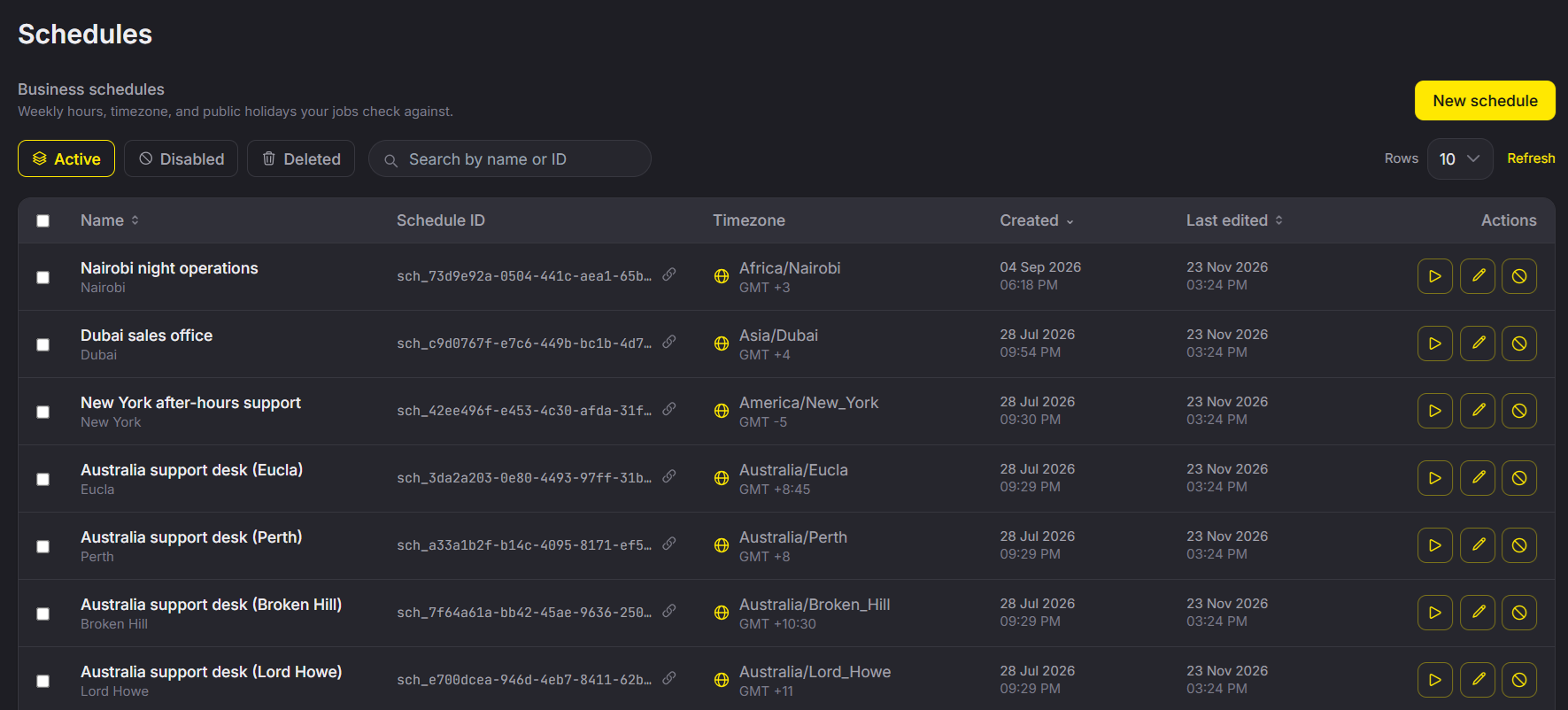
- Accurate local-time executionGive a local time and a timezone name such as Europe/Berlin. Netsware stores and shows both the local time and the exact UTC moment.
- Daylight saving transitionsIncluding the awkward days when clocks jump forward or back, so a 9:00 job stays at 9:00 local time all year.
- Multi-timezone schedulingCreate one schedule or one job across a list of timezones in a single request, and Netsware makes one for each zone.
- Overnight schedulingA shift from 22:00 to 06:00 is one shift that belongs to the day it starts, so the answer is right on both sides of midnight.
- Local holiday calendarsEach place keeps its own public holidays, including state and regional calendars, not just its own clock.
- Timezone on every callJob calls carry an X-Netsware-Timezone header, so your server knows which local time a run was scheduled in.
Run history and monitoring
See every run, find every problem
Every execution is recorded with its outcome, response code, duration and retry history. Inspect individual runs, investigate failures across your account and pull the numbers into your own monitoring.
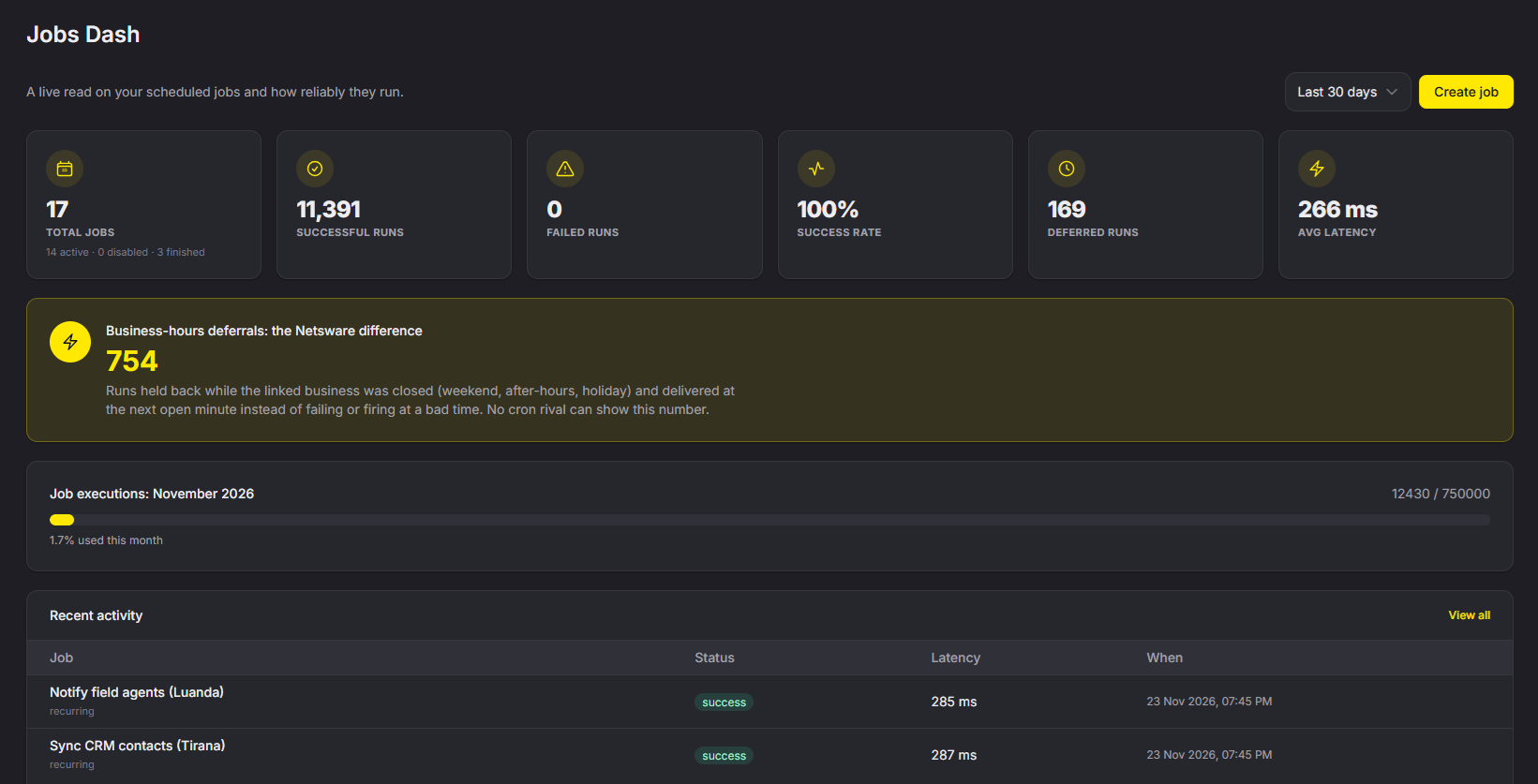
- Complete execution historyEach run with its status, HTTP code, duration, attempt number and error message, newest first, filterable by outcome.
- End-to-end run recordsOpen a single run to see its full trace, from the first attempt through every retry.
- Account-wide failure feedA feed of failed or delayed runs across all your jobs, so you can check everything in one place.
- Usage and execution metricsDaily totals of API requests, job runs and webhook deliveries, plus successes, failures, timeouts and delays, ready for your monitoring tool.
- Usage trackingSee how much of each monthly allowance you have used, with warnings as you get close to a limit.
- In-app notification inboxFailure alerts, recoveries and account notices collect in the in-app inbox.
Teams and workspaces
Manage schedules and jobs across your team
Bring your team into a shared workspace for schedules, jobs and run history. Roles decide who can change the setup and who has read-only access.
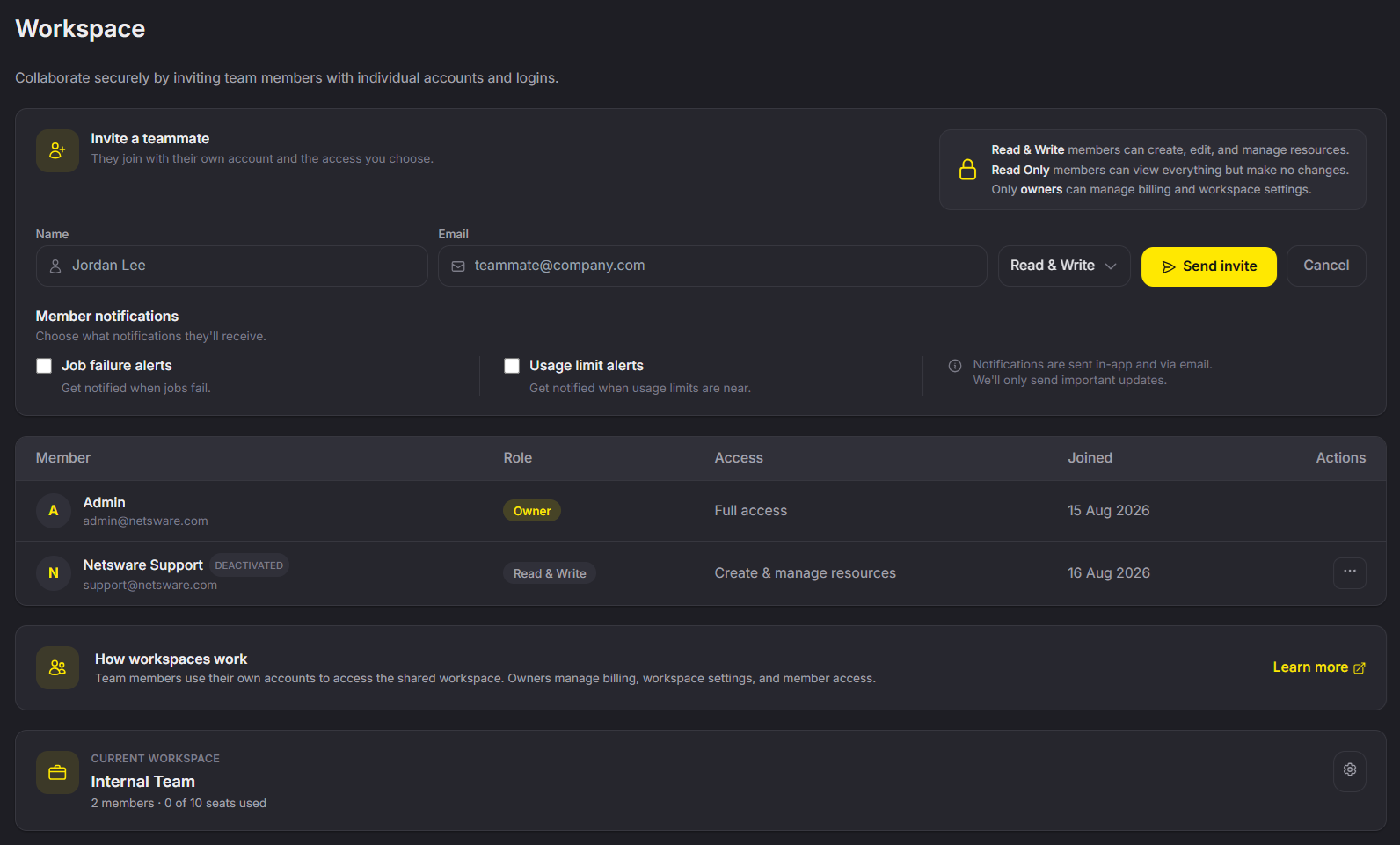
- Shared team workspacesSchedules, jobs and groups live in a workspace the whole team shares, alongside your own personal workspace.
- Role-based accessThe owner manages the workspace. Members can either edit or only view, so people who need to look never change anything by accident.
- Team invitationsSend an invitation to a teammate's email address. The invitation stays valid for seven days.
- Immediate permission updatesWhen a role changes or someone leaves, it takes effect immediately.
- Workspace switchingMove between your personal workspace and the team workspaces you belong to.
- Multi-client organizationKeep each client's automations organized and give your team the access it needs.
API and SDKs
A predictable API, built for developers
Add business-time logic and scheduled HTTP execution to your product through a consistent REST API. Use any language with an HTTP client, the official SDKs for Node.js and Python, or your AI coding assistant.
{
  "error": "invalid_timezone",
  "message": "\"Mars/Base\" is not a valid IANA timezone identifier",
  "docs": "https://app.netsware.com/dashboard/docs#check-hours",
  "usage": {
    "endpoint": "GET /v1/check",
    "example": "GET /v1/check?timezone=Asia/Tokyo&country=JP&open_time=10:00&close_time=18:30"
  }
}- Consistent REST APIWorks with any language and any HTTP client. One API key in a header, clear paths under /v1.
- Official Node.js and Python SDKsTyped methods, no extra packages, and a built-in webhook signature check.
- Actionable API errorsA wrong request names every field that failed and includes the right parameters and a working example, so you or your AI agent can fix it without guessing.
- Ready for AI coding assistantsA complete guide for AI coding tools, a short index in the llms.txt format and a full OpenAPI 3.1 spec, all generated from the API itself.
- Granular API key controlsCreate several keys, make some read-only, limit them to certain IP addresses and give them an expiry date.
- Event-driven webhooksSubscribe one URL to many events, such as job.failed or schedule.opened, each delivery signed and retried.
Security and your data
Security, built in
Your schedules, jobs, API keys and run data are protected by layered security controls, encrypted secrets and strict account isolation, on every account.
Two-factor authentication
Protect your account with an authenticator app and recovery codes. Sign-in attempts are rate limited and checked for bots.
Scoped API keys
Make a key read-only, allow it only from certain IP addresses, and give it an expiry date. Keys are stored only as a one-way hash, so no one can read them, not even us.
Encrypted secret storage
Tokens in your secret variables, alert channel links and webhook signing secrets are encrypted with AES-256 and only unlocked when the service needs to use them. Secret values are never shown again, not even through the API.
Signed webhooks and requests
Every delivery carries an HMAC-SHA256 signature and a timestamp, so your server can confirm it came from Netsware and reject old, replayed messages.
Unsafe request blocking
Netsware refuses to call private or internal network addresses, so a job can never be used to reach systems that should stay hidden.
Account-level data isolation
Every request is checked against your account, so no one else can reach your schedules, jobs or history.
EU-based data storage
Your account data is stored in data centers in the European Union, and it is backed up every day.
Encrypted data in transit
Every page and every API request uses HTTPS, and passwords are stored only as strong one-way hashes.
Data privacy and ownership
It is used only to run, secure and support the service. We never sell it and never use it to train AI models.
Questions
Can I configure different business hours for each day?
A schedule uses one opening and closing time across all its working days. If you need different hours, such as a shorter Saturday, create a separate schedule for those days.
Does Netsware support state and regional holidays?
Yes. For countries that have regional holiday calendars, pass a state or region code to retrieve the corresponding local holidays.
What happens when a scheduled job falls outside business hours?
If a job is linked to a business-hours schedule, Netsware defers it until the exact next open minute. The deferral is recorded with its reason and does not count as a failed attempt.
Do retries generate separate notifications?
No. Netsware sends one alert when a job starts failing, at most one reminder per day while it remains broken, and one notification when it recovers.
How does Netsware prevent duplicate execution?
Netsware is designed to execute each run once. In rare cases, such as a retry after a lost connection, your server may receive the same run more than once. Every job request includes an X-Netsware-Idempotency-Key header, which you can use to detect and safely ignore duplicate deliveries.
Which timezone identifiers are supported?
Use official IANA timezone identifiers, such as Europe/Berlin, America/New_York or Asia/Kolkata. An unrecognized identifier returns a clear API error.
How long does Netsware retain execution history?
Run history is kept according to your plan. Older records are removed automatically when that retention period ends.
What permissions does a read-only team member have?
Read-only members can view the workspace, including its schedules, jobs and execution history, but cannot make changes.
Does Netsware provide an OpenAPI specification?
Yes. Netsware provides a complete OpenAPI 3.1 specification covering every /v1 endpoint at app.netsware.com/openapi.json.
Where does Netsware store customer data?
Your account data is stored in data centers within the European Union. Some service providers, such as email delivery and payment processors, handle only the information they need to provide their services. These providers are listed in our privacy policy.
Looking for more details? View all FAQs or visit our Help Center.
Put business-aware scheduling to work
Create your first schedule, set business hours and run your first job from the dashboard or the API. Start free, with no credit card required.
Some limits and channels depend on your plan.