Guides Automation tools
How to skip public holidays and weekends in an n8n workflow
Short answer: The n8n Schedule Trigger cannot skip public holidays. Add an HTTP Request node that asks Netsware whether the business is open right now (GET /v1/check with a country and timezone), followed by an If node that continues only when open is true. On a public holiday, a weekend or outside business hours, the workflow stops quietly. It takes two extra nodes and no holiday list to maintain.
Why the n8n Schedule Trigger runs on public holidays
A typical n8n workflow runs on a Schedule Trigger, for example every weekday at 09:00, to send invoice reminders, post a daily report or pass leads to a sales team. On a public holiday it runs anyway: customers receive reminders on Christmas Day, and the team gets a report that nobody is there to read.
The Schedule Trigger can select days of the week, but it cannot know that this Monday is a bank holiday in the UK, or that the weekend is Saturday and Sunday in the UAE but Friday and Saturday in Saudi Arabia.
The common workarounds are fragile:
- A hard-coded list of dates in a Code node: someone must update it every year, for every country.
- A Google Calendar holiday lookup: more nodes and credentials, and coverage varies by country.
- Ignoring it: the workflow is correct until the first public holiday.
Two ways to fix it with Netsware
| Method 1: "Ask first" | Method 2: "Netsware triggers n8n" | |
|---|---|---|
| How | n8n keeps its own trigger and asks Netsware before continuing | Netsware calls your n8n Webhook only when the business is open |
| Extra nodes | HTTP Request and If | a Webhook node replaces the Schedule Trigger |
| Best for | existing workflows you do not want to rebuild | new workflows, or when a held-back run should happen later instead of being skipped |
Both methods use the same Netsware API key. Create one in the Netsware dashboard under API Keys. The free plan is enough to start.
Method 1: Ask first (HTTP Request and If)
When you're done, the workflow has three nodes:
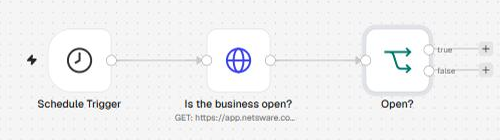
Step 1: Save your API key as an n8n credential
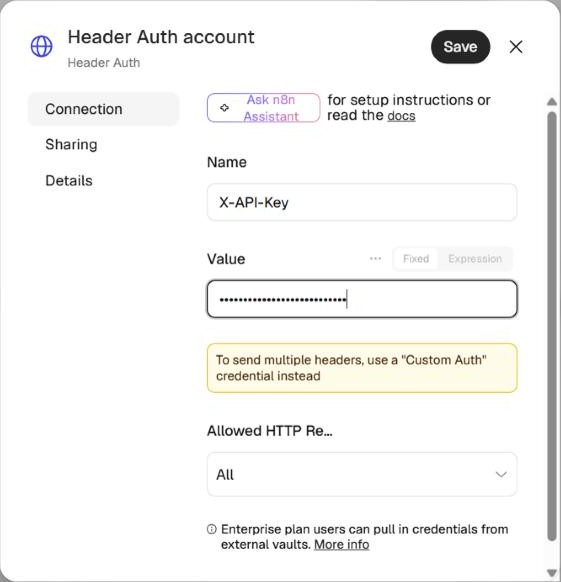
In n8n, create a new credential of type Header Auth (you can also create it from the HTTP Request node in step 2):
- Name:
X-API-Key - Value: your Netsware API key
- Allowed HTTP Request Domains: set it to
app.netsware.com, so the key is only ever sent to Netsware.
Netsware reads the key from the X-API-Key header, not from Authorization: Bearer.
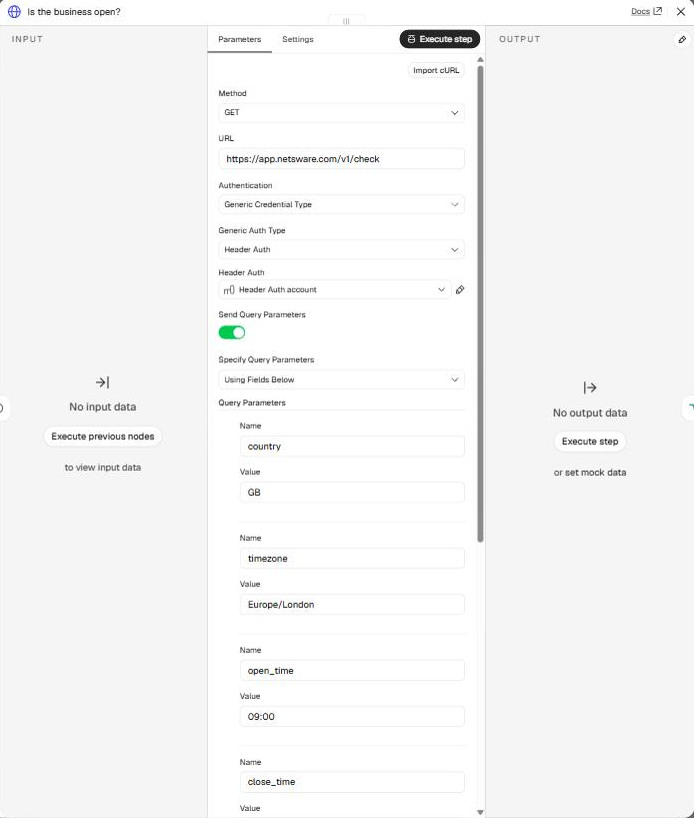
Step 2: Add an HTTP Request node after your trigger
- Method: GET
- URL:
https://app.netsware.com/v1/check - Authentication: Generic Credential Type, then Header Auth. Pick the credential from step 1, or click Connect to Header Auth to open the credential form (Name and Value) and create it here.
- Query parameters:
| Name | Value (example) | Meaning |
|---|---|---|
country | GB | Country for public holidays (ISO code) |
timezone | Europe/London | The business's timezone |
open_time | 09:00 | Opening time (default 09:00) |
close_time | 17:30 | Closing time (default 18:00) |
days | MON,TUE,WED,THU,FRI | Working days (default Mon to Fri) |
Netsware doesn't guess the weekend: you pass the open days. For a Friday and Saturday weekend, as in Saudi Arabia, use days=SUN,MON,TUE,WED,THU. GET /v1/hours/meta/countries lists each country's usual weekend if you need it.
The reply looks like this:
{
  "open": false,
  "reason": "public_holiday",
  "holiday_name": "Christmas Day",
  "local_time": "...",
  "next_open": { "utc": "...", "local": "...", "day": "..." }
}
reason tells you why it's closed: public_holiday, weekend, before_hours or after_hours. On a holiday, holiday_name tells you which one.
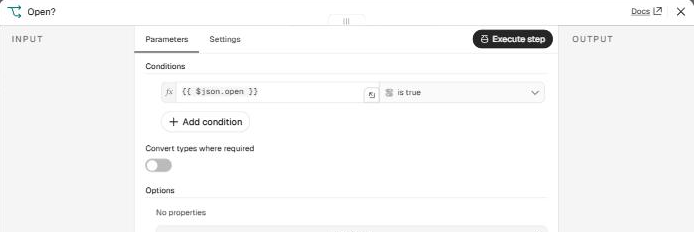
Step 3: Add an If node
- Condition: Boolean,
{{ $json.open }}is true - True branch: connect the rest of your workflow
- False branch: leave it empty, or log
{{ $json.reason }}somewhere if you want a record
On a public holiday the workflow now stops at the If node, and nothing is sent.
Tip: if your workflow serves customers in different countries, set country and timezone from each item's data (for example {{ $json.customer_country }}) and the check is made per customer, in their own local time.
Cost note: each check is one API request against your plan's monthly quota (20,000 on the free plan). The per-customer tip makes one request per item, so 500 customers a day means 500 requests a day. If many customers share a country, check once per country instead.
Method 2: Let Netsware trigger n8n only when the business is open
Method 1 skips closed days. If a run that falls on a holiday should happen on the next working day instead, let Netsware trigger the workflow.
Step 1: Start the workflow with a Webhook node
Replace the Schedule Trigger with a Webhook node (method POST), publish the workflow, and copy its Production URL.
Step 2: Protect the webhook (important)
An n8n Production webhook URL is public, so anyone who finds it could start your workflow. Lock it:
- In the Webhook node, set Authentication to Header Auth and create a credential with a header name (for example
X-Webhook-Token) and a long random value. - Store that same value in Netsware as a secret variable, allowed only for your n8n host:
curl -X PUT https://app.netsware.com/v1/variables \
  -H "X-API-Key: $NETSWARE_KEY" \
  -H "Content-Type: application/json" \
  -d '{
    "name": "N8N_WEBHOOK_TOKEN",
    "value": "your-long-random-value",
    "is_secret": true,
    "allowed_destinations": ["your-n8n.example.com"]
  }'
The job in step 4 sends it as a header, so only Netsware can start the workflow.
Step 3: In Netsware, create a business-hours schedule
In the dashboard, or with one API request:
curl -X POST https://app.netsware.com/v1/schedules \
  -H "X-API-Key: $NETSWARE_KEY" \
  -H "Content-Type: application/json" \
  -d '{
    "name": "UK office hours",
    "country_code": "GB",
    "timezone": "Europe/London",
    "days": ["MON","TUE","WED","THU","FRI"],
    "open_time": "09:00",
    "close_time": "17:30",
    "respect_holidays": true
  }'
Step 4: Create a job that calls your n8n webhook
curl -X POST https://app.netsware.com/v1/jobs \
  -H "X-API-Key: $NETSWARE_KEY" \
  -H "Content-Type: application/json" \
  -d '{
    "type": "recurring",
    "name": "Daily report (n8n)",
    "url": "https://your-n8n.example.com/webhook/...",
    "method": "POST",
    "timezone": "Europe/London",
    "cron": "0 9 * * MON-FRI",
    "headers": { "X-Webhook-Token": "{{N8N_WEBHOOK_TOKEN}}" },
    "business_hours_schedule_id": "sch_..."
  }'
Now when 09:00 lands on a bank holiday, Netsware holds the run and calls n8n at the next opening minute, the next working morning. Each held-back run is logged with its reason (for example public_holiday), and if n8n is down the call is retried and you can be alerted, by email even on the free plan.
FAQ
How do I stop an n8n workflow from running on public holidays?
Add an HTTP Request node that calls GET /v1/check with the country and timezone, then an If node that continues only when open is true. Alternatively, let a Netsware job start the workflow through a Webhook node, so runs on public holidays move to the next working day.
Which countries are covered?
226 countries and territories, including regional and state holidays where they apply. You choose the open days (for example SUN to THU for a Friday and Saturday weekend), and GET /v1/hours/meta/countries returns every country's usual weekend. The free Essentials plan includes 10 holiday countries: the US, India, the UK, Germany, France, Canada, Australia, Japan, Singapore and Brazil. Paid plans include all 226.
Does this work with self-hosted n8n and n8n Cloud?
Yes. Method 1 is an outgoing HTTP request, which works anywhere. Method 2 needs your n8n Webhook URL to be reachable from the internet.
Can I get the list of public holidays for a country?
Yes. GET https://app.netsware.com/v1/holidays?country=GB&year=2026 returns every public holiday for that year with its date and name.
Does the same approach work in Zapier or Make?
Yes. See How to make Zapier skip weekends and public holidays and How to run a Make scenario only on working days.
Does it cost anything?
The Essentials plan is free forever and does not require a credit card.
Summary
n8n decides what to do. Netsware knows when the business is open. Add an HTTP Request node and an If node to skip public holidays and weekends, or let Netsware trigger the workflow so runs on closed days move to the next working day. Either way, there is no holiday list to maintain.
Related guides: How to run a webhook only during business hours · How to make Zapier skip weekends and public holidays
Start free. No credit card, no trial period. The Essentials plan is free forever, so you can build and test your software, apps and workflows for as long as you need, and upgrade only when you are ready.
Start freeSpotted a mistake or something out of date? Tell us and we will fix it.
Keep reading
Run Make scenarios on working days
The Make scheduler cannot skip public holidays. Add an HTTP module that asks Netsware if the business is open and a filter, or let Netsware start the scenario.
Skip weekends and holidays in Zapier
Schedule by Zapier cannot skip public holidays. Add a webhook step that asks Netsware if the business is open and a filter, or let Netsware start your Zap.
Skip public holidays in cron
Cron cannot skip public holidays. Add a one-line holiday check to your cron script, or run the cron job on Netsware so holiday runs move to the next business day.